Xander’s Sodium Options: Continued
%20scale(1%201)'%3e%3cg%20transform='translate(0%205)%20rotate(0)%20scale(0.78)%20translate(-200%20-200)'%20fill='%23dcedd5'%3e%3cpath%20fill-rule='evenodd'%20d='M153%2065C160%2065%20181%2080%20193%2084H207C219%2080%20239%2066%20246%2066C254%2064%20288%2084%20294%2094C298%20101%20296%20125%20300%20139L307%20151C317%20159%20335%20168%20339%20175C345%20185%20345%20218%20340%20229C335%20236%20316%20245%20306%20254L299%20267C296%20280%20298%20301%20293%20309C287%20319%20255%20337%20247%20337C239%20337%20219%20323%20207%20319H193C180%20323%20162%20336%20154%20337C145%20338%20113%20319%20107%20309C101%20301%20105%20280%20101%20267L94%20254C84%20246%2065%20236%2060%20229C55%20219%2055%20185%2060%20175C64%20168%2083%20159%2093%20151L100%20139C105%20126%20102%20102%20107%2094C114%2084%20144%2066%20153%2065Z%20M266%20200A66%2066%200%201%200%20134%20200A66%2066%200%201%200%20266%20200Z'/%3e%3c/g%3e%3cg%20transform='rotate(0)%20scale(0.78)%20translate(-200%20-200)'%20fill='%23ffffff'%3e%3cpath%20fill-rule='evenodd'%20d='M153%2065C160%2065%20181%2080%20193%2084H207C219%2080%20239%2066%20246%2066C254%2064%20288%2084%20294%2094C298%20101%20296%20125%20300%20139L307%20151C317%20159%20335%20168%20339%20175C345%20185%20345%20218%20340%20229C335%20236%20316%20245%20306%20254L299%20267C296%20280%20298%20301%20293%20309C287%20319%20255%20337%20247%20337C239%20337%20219%20323%20207%20319H193C180%20323%20162%20336%20154%20337C145%20338%20113%20319%20107%20309C101%20301%20105%20280%20101%20267L94%20254C84%20246%2065%20236%2060%20229C55%20219%2055%20185%2060%20175C64%20168%2083%20159%2093%20151L100%20139C105%20126%20102%20102%20107%2094C114%2084%20144%2066%20153%2065Z%20M266%20200A66%2066%200%201%200%20134%20200A66%2066%200%201%200%20266%20200Z'/%3e%3c/g%3e%3c/g%3e%3c/svg%3e)
Sodium1 is in pretty much every modded setup nowadays, but its settings screen has always felt a bit alien to me, with a layout and controls that look nothing like the rest of Minecraft’s menus.
Xander’s Sodium Options, made by isXander, fixed that for me by swapping Sodium’s screen for one built from the same kind of controls as Minecraft’s own settings. I used it religiously after discovering it, but was sad to see it stop getting updates after 1.21.5, so I reached out to isXander, got permission to continue it, and picked it up as Xander’s Sodium Options: Continued.
Picking up where it stopped
When I took it over, it hadn’t kept up with newer versions of Minecraft or Sodium, and a few parts of the menu had stopped working. I decided to start exactly where the original left off, so the oldest version I support is 1.21.6, the one right after the original’s last update, which is my own way of respecting the work that came before mine.
Most of the early work was catching it up with Sodium 0.8, which had changed how its settings are put together enough that I ended up reworking a big part of the mod around it, and it actually came out a lot smaller than before. After that I fixed the bits that had broken along the way and ported it to NeoForge2, so people on either of the two big mod loaders can use it.
Making it feel like Minecraft
What I care about most is that the menu doesn’t feel modded at all, and most of what I’ve added since comes from that. When Sodium started grouping its settings into tabs, the mod followed, and when one setting can’t be changed because of another, like with a shader pack turned on, it locks the same way it would in Sodium, so nothing in the menu behaves differently from what you’d expect.
Video settings usually come from more than one mod, so settings from Iris, Sodium Extra, More Culling and LambDynamicLights3 all show up in the same menu and look like the rest of it, though if you’d rather use the screens those mods come with, you can open those instead.
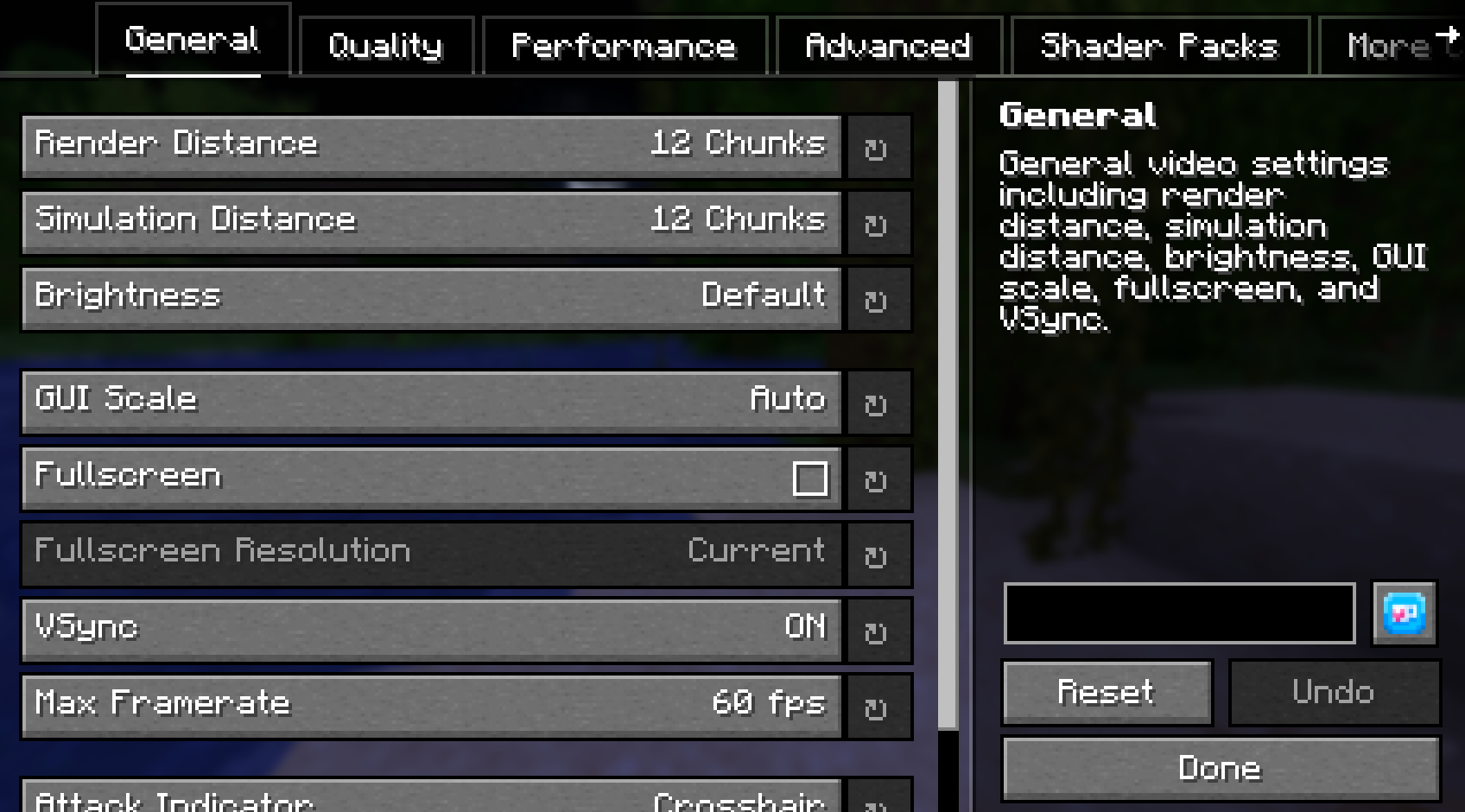
A good chunk of the work also went into keyboard support, so you can get through the whole menu without touching the mouse, from jumping between tabs to moving through every setting and resetting things, and if you try to leave with unsaved changes, it asks first instead of throwing them away.
Where it’s at
The biggest update since was in September 2026, when I brought it up to Minecraft 26.1 through 26.3. Minecraft 26.2 moved the code that opens screens, so the mod suddenly stopped noticing when Sodium’s menu opened and you’d just get Sodium’s own screen again, which meant going through every place the mod opens or looks at a screen and moving it over.
People appreciate me continuing the legacy of this old project, the feedback has been good, and it’s been downloaded 30k times across Modrinth and CurseForge so far (this number is up to date as of today, woah technology!). It’s in a very good place right now, so there isn’t big changes I want to add, and most of what’s left is keeping it up to date and fixing things as they come in, like when another mod that changes menus doesn’t get along with it. If you wanna make your settings more immersive, then you can get it on Modrinth and CurseForge!
- Sodium replaces Minecraft’s rendering engine with a much faster one, raising frame rates and cutting down on stutter. With over 380 million downloads across Modrinth and CurseForge, it’s one of the most downloaded Minecraft mods there is, second only to Fabric API, the library most Fabric mods need, on Modrinth.
- NeoForge and Fabric are the two main mod loaders for Minecraft, and a mod has to be built for each one separately.
- Iris, Sodium Extra, More Culling and LambDynamicLights are Minecraft mods that add their own video settings, covering shaders, extra visual and performance options, smarter culling, and light from held items.